

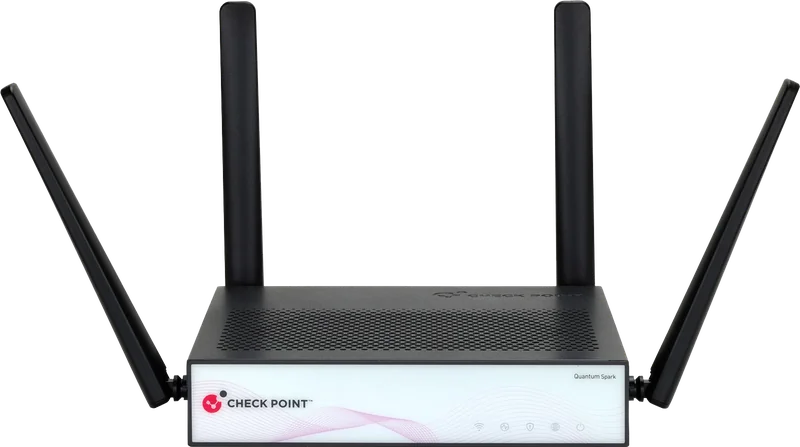
Spark 2530
For offices with 5, 10 or 25 users
Desktop appliance for a small office, shop or small branch.
- With all protections
- 750 Mbps
- As a firewall (NGFW)
- 1 200 Mbps
Attacks most often get in through three places: the office network, email, and the AI tools your employees use. Check Point has a solution for each, and A1 helps you choose, deploy and run the protection.
+61%rise in cyberattacks on small and medium businesses in one year
90%+of attacks on organisations start with a malicious email
90%+of internet traffic is encrypted and invisible to older firewalls
Source: Check Point Research (July 2025) and Check Point data.

Next generation firewall for small and medium businesses and branch offices
One compact device brings together threat prevention, secure remote access (VPN) and protection for every connected device in the office. No cyber security specialist needed.
The same prevention technology Check Point uses across all its firewalls, in a device sized for a small office. According to the vendor, Check Point ranks #1 for security effectiveness in independent tests, including Miercom and NSS Labs.
Stops malware, phishing, exploits and AI generated attacks before they reach computers and servers.
Over 90% of traffic is HTTPS. With R82 software, Spark inspects it too and stops the hardest to detect attacks without slowing the internal network.
Encrypted links between offices and VPN access to company resources for 100 to 1,000 remote users.
See how employees use the internet and set rules per application and user. Settings, monitoring and alerts live in one place, locally or in the cloud for many sites.
Everything the device includes
The device sits between the internet and the office network. All inbound and outbound traffic passes through it.
Installed between the internet and the office network.
Which user and app is using the connection, where it goes and whether it carries malicious code, encrypted traffic included.
Threats are stopped before they reach devices. Unknown files are tested in an isolated sandbox.
Works with more than one internet link and keeps going if one drops.
When two internet links are available.Settings, monitoring and alerts in one place.
Both models run R82 software, have the same protections and are managed the same way. They differ in performance and ports, and you choose by the number of users in the office.
For offices with 5, 10 or 25 users
Desktop appliance for a small office, shop or small branch.
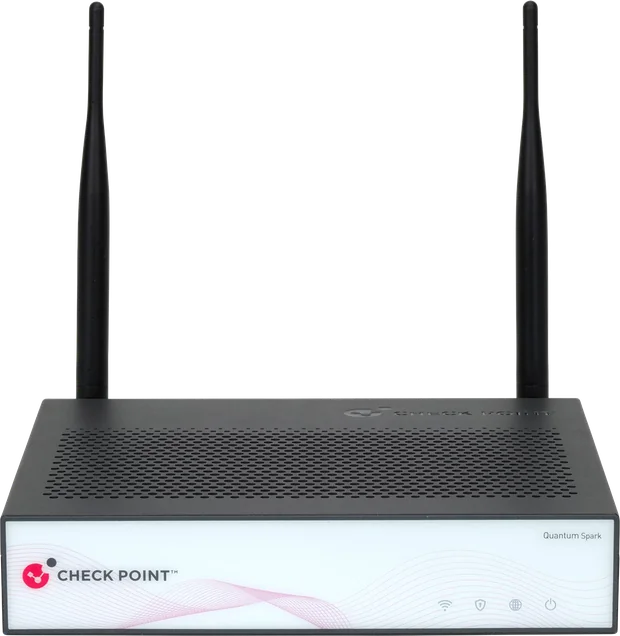
For offices with 50 or 100 users
Desktop appliance for a mid size office or larger branch.
Throughput figures are maximums according to Check Point. The photos show the Wi-Fi versions. The model is confirmed after a conversation, based on users, internet speed and the protections you enable.
The first year always includes the most complete package, SNBT. After that you choose one of the three packages.
| Protection | NGFW | NGTP | SNBT |
|---|---|---|---|
| Application control | |||
| Intrusion prevention (IPS) | |||
| URL filtering | - | ||
| Antivirus | - | ||
| Anti-Bot | - | ||
| Anti-Spam | - | ||
| Sandboxing for unknown files | - | - | |
| Zero Phishing | - | - |
Spark Management, the cloud platform for monitoring and managing many devices, comes at no extra cost.
Small and medium businesses and branch offices with no in-house security specialist that handle sensitive data, have more than one site or still rely on the internet provider's router.
| Customer type | Examples | Typical need | Suggested model |
|---|---|---|---|
| Small professional services office | Accounting or law firm, architecture studio, insurance broker | Protecting client data without an IT department | Spark 2530 |
| Multi site retail | Retail chain, pharmacies, petrol stations | The same protection at every site with central management | Spark 2530 Spark 2560 |
| Healthcare | Medical centre, dental clinic, laboratory | Protecting patient data and connected equipment | Spark 2560 |
Tell us how many users and sites you have and we will suggest a model and subscription.
Ask about Spark 2500
Protection for cloud email, files and chat in Microsoft 365 and Google Workspace
A cloud service that stops phishing, malware, data leaks and account takeover attempts. It connects directly to your environment, with no appliances, servers or software on your side. One licence covers email, shared files and chat.
According to Check Point.
Over 90% of attacks on organisations start with a malicious email, and 75% of ransomware attacks arrive by email. The built-in protection of cloud platforms misses well crafted scams, so Harmony adds a second layer on top.
Inbound, outbound and internal email in every mailbox.
Files and links in file sharing services.
Messages, files and links in chat.
Someone in accounting receives an email that looks like it came from the managing director, asking for an urgent payment to a new bank account. Harmony analyses the links, the language and the conversation history, recognises the sender is impersonating someone, and stops the email before the employee sees it.
The same goes for attachments. A supplier “invoice” carrying malicious code is tested in a sandbox, and the employee gets a clean, safe copy without any interruption.
From: Managing Director <director@company-pay.co>
To: Accounting
Please pay the attached invoice today. The supplier changed bank accounts, the new IBAN is in the attachment.
Threat protection, data and account protection and protection beyond email, in one dashboard.
Recognises when someone impersonates a colleague, manager or partner.
Unknown files are tested in a sandbox and the employee gets a safe version right away.
Stops attacks that start from an already compromised account inside the company.
Recognises sensitive data such as card numbers and personal data and blocks it from being shared.
Blocks suspicious attempts to sign in to employee accounts.
Checks files and links in Teams, Slack and file sharing and quarantines anything dangerous.
It connects directly to the cloud platform through its APIs. No appliances, servers or software on your side.
To Microsoft 365 or Google Workspace in about five minutes.
Scans email already received to find existing threats.
Attachments, links, language and conversation history.
Dangerous email stops before the inbox, files are cleaned, sensitive data stays in.
All events and reports in one dashboard.
Choose the package by whether you handle sensitive data and whether you use collaboration apps as well as email. DLP is included only in Complete Protect.
Sector suggestions are indicative.
Companies that use Microsoft 365 or Google Workspace, rely only on its built-in protection, exchange invoices, payments, contracts or personal data by email and have no large security team.
| Customer type | Examples | Typical need | Suggested package |
|---|---|---|---|
| Professional services | Law firm, accounting or consulting firm | Keeping confidential documents and client personal data from leaking by email | Complete Protect, Email only |
| Financial sector | Insurance broker, fintech, leasing company | Protection from payment fraud and control of financial data; regulatory requirements | Complete Protect, Email & Collaboration |
| Healthcare | Medical centre, dental clinic, laboratory | Protecting patient data in email and shared files | Complete Protect, Email & Collaboration |
| Companies with hybrid teams | Software company, marketing agency, sales team across several offices | Protecting Teams, Slack and shared files, not just email | Advanced Protect, Email & Collaboration |
Tell us which platform you use and how many mailboxes you have and we will suggest a package.
Ask about Harmony
Safe use of AI by employees, instead of a ban
A platform that shows which AI tools your employees use, such as ChatGPT, Gemini, Claude and Copilot, assesses the risk and stops sensitive data before it leaves the company. Without slowing anyone down.
Employees already use AI, often without IT knowing (so called shadow AI), and financial data, contracts and code end up in their prompts. The platform gives visibility, risk assessment and control over every interaction.
All AI use in the company, from chat assistants to coding tools and unapproved apps.
The risk of each AI app against your security and compliance requirements.
Flexible rules by app, user and data type.
Risky actions are blocked in real time and sensitive data is stopped before it leaves.
The platform recognises when a prompt really contains sensitive information and when it only sounds like it. Passwords, personal data and other sensitive information are replaced with placeholders before they reach the AI, in text, files and images.
Summarise our contract with client Maria Petrova[NAME], ID no. 8504126543[ID], and check whether the payment to account BG80 BNBG 9661 1020 3456 78[IBAN] is on time.
The prompt contains personal and banking data.
A platform, not an appliance: it deploys in minutes on browsers and devices, with no changes to your infrastructure, and protects from day one.
ChatGPT, Gemini, Claude, Copilot and other web apps.
AI programs installed on the employee's computer.
Extensions with built-in AI features.
AI built into the cloud platforms you already use, and their third party integrations.
Coding assistants.
Autonomous AI assistants and their connections to company systems.
Choose by where your employees work with AI.
Covers AI use through web apps.
Covers web and desktop apps, software development environments and MCP connections.
Records and reports on AI use that help you show compliance with GDPR, HIPAA and the EU AI Act.
Right after deployment you see every AI interaction, unapproved apps included, and can apply rules.
Companies whose employees already work with AI, handle personal and financial data, trade secrets or code, face audits and want to encourage AI in a controlled way.
| Customer type | Examples | Typical need |
|---|---|---|
| Financial sector | Bank, insurance company, fintech | Keep client and financial data out of AI tools; reports for audits |
| Healthcare | Hospital, medical centre, laboratory | Protecting patient data when using AI |
| Software and IT companies | Software company, IT department of a large organisation | Protecting code and secrets when using coding assistants and AI agents |
| Professional services | Law firm, accounting or consulting firm | Keep confidential client documents out of AI tools |
| Manufacturing and trade | Manufacturer, retail chain, distributor | Protecting trade secrets, prices and contracts |
| Large organisations | Telecom, energy company, public institution | Visibility of AI across the whole team and one set of rules |
Find out which AI tools are already in use in your company.
Ask about Workforce AI SecurityThe three solutions guard different entry points and work together. If you are not sure where to start, see which description sounds most like you.
From the first conversation to protection that works, with one partner and in your language.
We talk about your network, email, AI tools, users and sites.
We recommend a solution, model or package and the number of licences.
We install and configure. Cloud services connect in minutes.
A1 experts stay with you for questions and changes.
No. Spark 2500 is built for companies without an in-house specialist. Management is simple, with dashboards and automatic alerts, and the device can also be run by a managed service provider.
Spark 2530 is for offices with 5, 10 or 25 users and Spark 2560 for offices with 50 or 100 users. The final choice also depends on internet speed and the protections you enable, so we confirm it after a conversation.
The first year always includes the SNBT package with every protection. After that you choose one of three packages: NGFW, NGTP or SNBT.
Built-in protection stops many mass attacks but misses well crafted scams, such as an email in the director's name asking for a payment. Harmony Email & Collaboration works as a second layer on top and also checks internal email, files and chat.
Connecting to Microsoft 365 or Google Workspace takes about five minutes, with no appliances or software on your side. On day one the service also scans email you have already received.
It doesn't have to. You decide which apps are allowed, what data can be entered and whether files can be uploaded. Sensitive data is replaced with placeholders, and for risky actions the employee sees a warning without their work being stopped.
The platform records how employees use AI and produces reports that help the company show compliance with GDPR, HIPAA and the EU AI Act. Reports can be tailored to your needs.
Yes. Spark 2500 protects the office network, Harmony protects email and collaboration, and Workforce AI Security protects data when people work with AI. At the consultation we will tell you where it makes most sense to start.
The price depends on the model or package, the number of users and the subscription term. After a short conversation you will receive a specific proposal.
It takes less than a minute. An A1 expert will contact you within 72 hours.


Name, company and email are required.